
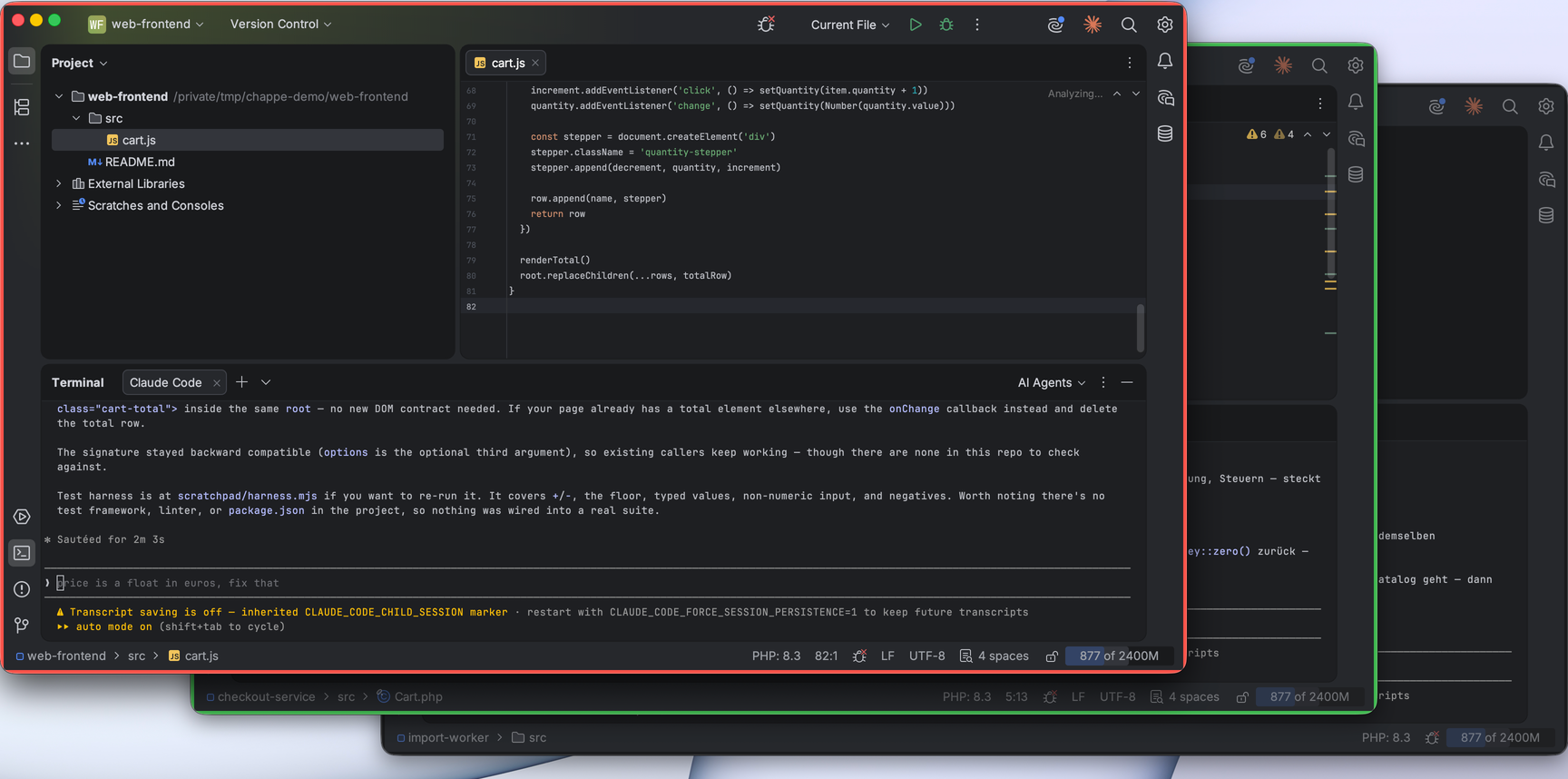
With four IDE windows open you can no longer tell which session is waiting. The plugin colours the window edge.
On an ordinary afternoon I have three to five PhpStorm and IntelliJ windows open, each with a Claude Code session running in its terminal. One is working through a refactoring, one wants a permission approved, one finished ten minutes ago and nobody noticed. From the outside all three look the same. So you click through them — and reliably land first in the window that has nothing for you.
Claude Chappe solves that one case. The plugin colours each project window by the state of the sessions running in it: green while a session is processing, red as soon as one needs a decision or has finished its turn. The window gets a coloured border and, optionally, a tinted status bar. That second part sounds cosmetic and is the more useful half: when windows overlap, that strip is often all you can still see of a background window.
The plugin depends on the IntelliJ platform only, not on any language support, so it runs in every JetBrains IDE from 2025.1 on — PhpStorm, IntelliJ, WebStorm, PyCharm, GoLand.
Claude Chappe on GitHub
Open source, MIT-licensed. Kotlin, IntelliJ platform, plus a hook script for Claude Code. Not on the JetBrains Marketplace yet — until then it's ./gradlew buildPlugin and installing the ZIP from build/distributions/ by hand.
How it works
Claude Code can run shell commands on certain events. That is where the plugin hooks in: a small POSIX script writes the current state of the session into a file under ~/.claude/ide-status/ whenever an event fires.
// ~/.claude/ide-status/<session-id>.json
{ "session": "…", "cwd": "/path/to/project", "state": "working", "ts": 1787047737, "pid": 30037 }

The plugin reads that directory at short intervals and compares each session's cwd against the base path of every open project. Sessions in subdirectories count towards the project above them, so a session started in apps/api colours the repository window.
No terminal output is parsed and the process list is not searched for running Claude instances. The process table answers exactly one question: is the PID from the status file still alive? If it isn't, the session crashed, the file goes, and a dead working state cannot keep a window green forever.
The installer registers six events:
| Event | State | |
|---|---|---|
SessionStart | idle | A session exists, nothing running yet. |
UserPromptSubmit | working | A prompt went out. |
PostToolUse | working | A tool call finished. |
Notification | waiting | Claude wants a decision, or is waiting for input. |
Stop | idle | Claude finished its turn. |
SessionEnd | — | The status file is removed. |
PostToolUse is in that list because one case would otherwise stay open: approving a permission dialog is not a prompt submission. Without that event the window would stay red while Claude has long since carried on.
The hooks report states, not colours
That is the one decision the whole design rests on. The script knows working, waiting and idle, and nothing beyond that. Whether a finished session deserves attention, whether it turns red, how red: all of that lives in the plugin.
The reason is practical. Hooks are read when a session starts, so changing them means restarting every running session. Plugin settings take effect immediately. Anything you are likely to change your mind about therefore belongs on the plugin side: whether a finished turn asks for attention at all (on by default, switch it off to reserve red for actual permission prompts), and whether looking at the window clears that signal again.
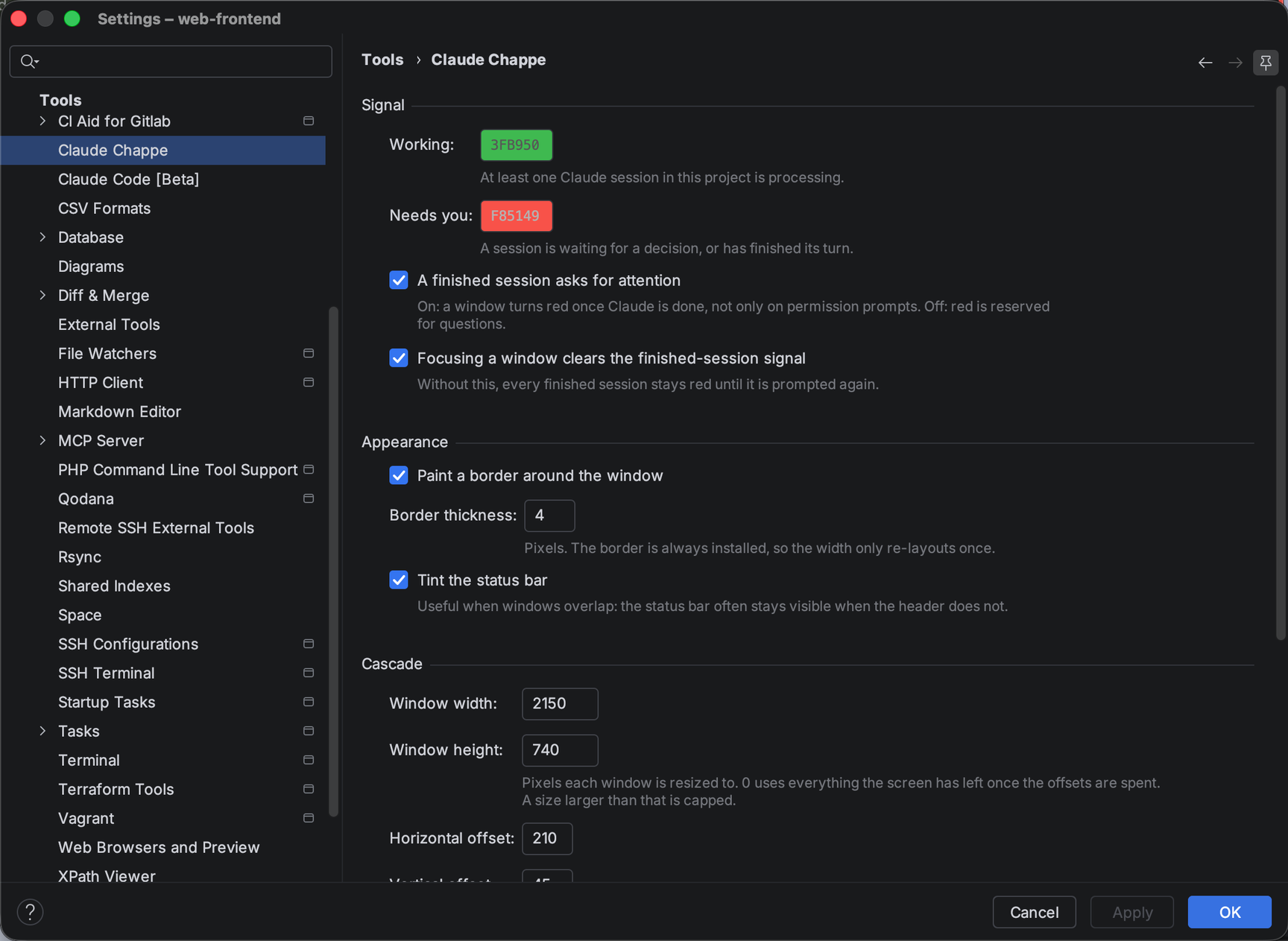
The focus case is the one I had underestimated. Without it, every finished session stays red until you give it the next prompt — after an hour half the screen glows and says nothing. Which is also why the window you are currently working in never turns red.
Three smaller decisions from the same corner:
Polling instead of a file watcher. The directory holds a handful of tiny files and a listing costs next to nothing. A watcher would bring along platform-specific failure modes to reproduce one by one.
The border is installed once, and only its colour changes afterwards. Swapping the border itself changes the root pane insets, and the window does a full re-layout on every state change. With a stack of open projects that is very visible.
Both paths are resolved before they are compared. The IDE reports the project path with symlinks resolved, while the hook writes the working directory as the shell saw it. On macOS, /tmp against /private/tmp is enough, and a project opened through a link stays uncoloured. That was the first bugfix after the release.
Stacking the windows
Window → Cascade Project Windows came out of the same work: every open project window of that IDE lands on one screen, offset step by step, the most urgent one in front and fully visible. The stack sits flush with the top and is centred horizontally, which is easier on a wide monitor than clinging to the left edge. Size and offsets come from the settings.
This works because all project windows of a JetBrains IDE live in the same process, so the plugin places them itself. No accessibility permissions, no window manager scripting, nothing that runs into a permission prompt with the next macOS update.
Where the name comes from
In 1792 Claude Chappe built the optical telegraph: a chain of towers with movable arms that could be read from the next hilltop, carrying a message across France in minutes. State over distance, conveyed by nothing but what you can see from far away. Which is what a coloured window edge does at the other end of a stack of IDEs.
That the first name fits was a pleasant coincidence.
Limits
One case stays open by design: approve a permission dialog, let the tool run for minutes, and you sit in front of a red window for that long. Claude Code has no event for the moment a permission is granted; the next signal is PostToolUse, which arrives once the tool returns.
Beyond that: jq has to be there, and the hook script is POSIX shell, so on Windows it needs Git Bash or WSL. Sessions that were already running before the installer ran keep their old hook configuration until you restart them.
Conclusion
The plugin is small and does one thing. It started with me clicking through four windows once again to find the one that was waiting for me. Since then the answer sits at the window edge.
The more interesting part was not the colouring but the question of how the IDE learns what happens inside a terminal without anyone parsing output. The hooks give Claude Code a clean interface to the outside — six events, one small file, done. That can carry rather more than colours.
Call to action
Claude Chappe is open source and available on GitHub: https://github.com/McGo/claude-chappe
Bug reports and pull requests are welcome. And if you are running Claude Code across a team and wondering where the sensible connection points between agents, IDE and your existing toolchain are, feel free to get in touch.